Emelyn

Navigation

Approve the exact version that will move forward.

Emelyn keeps feedback, requested changes, approval steps, and the publishing handoff attached to one content version. Everyone can see what changed, who decided, and whether a later edit requires approval again.

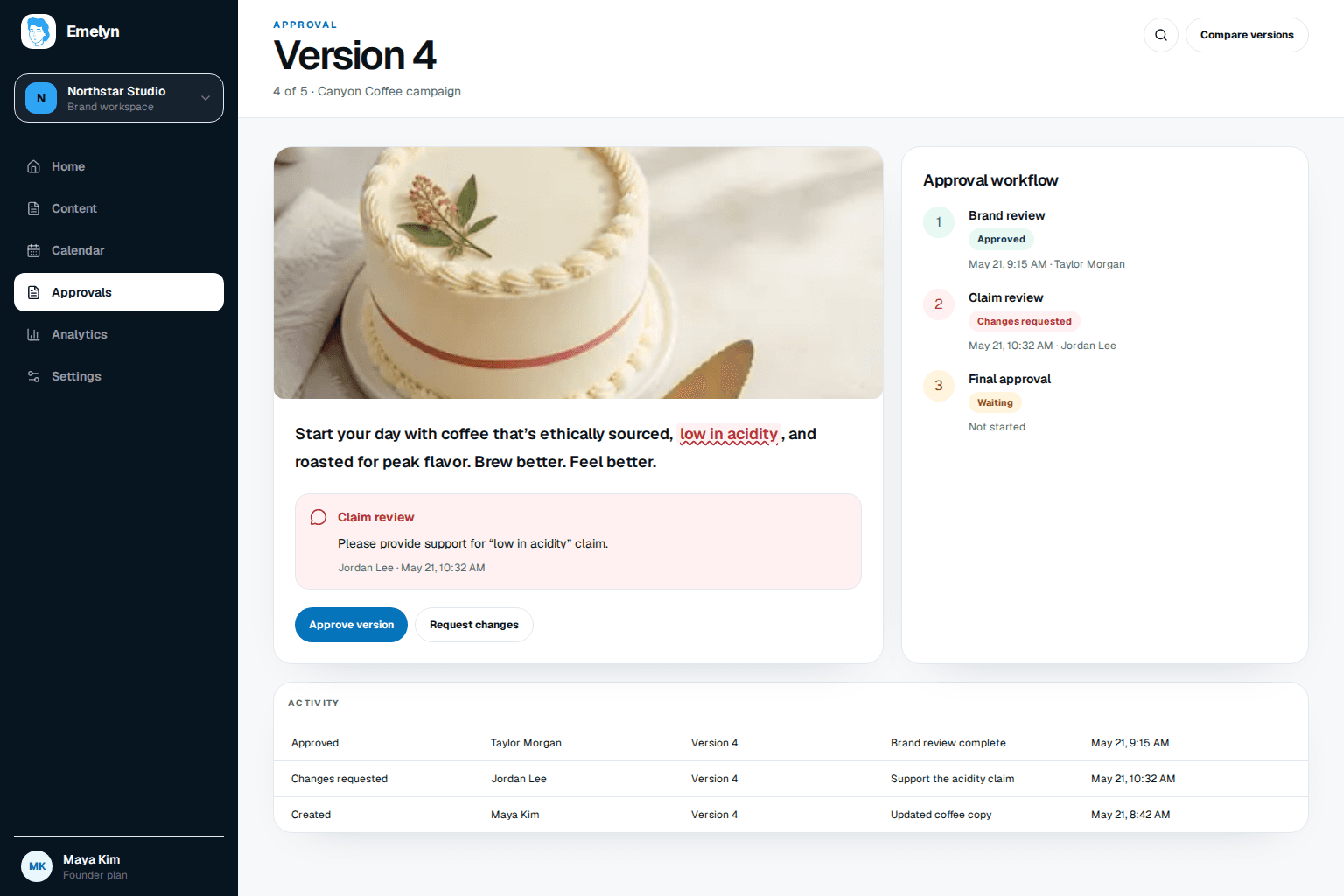
Emelyn approval workspace showing version four, inline claim feedback, ordered approval steps, action history, and buttons to approve or request changes
Feedback, decisions, and history stay attached to Version 4—not a copy in somebody's inbox.

A thumbs-up is not useful if nobody knows which version it approved.

Comments, change requests, formal approvals, and later edits need different states. Each one stays attached to the work it controls.

  1. 01

    Version 3

    Brand review passes. One factual claim still needs support.

    Approved for message
  2. 02

    Claim feedback

    The reviewer requests evidence beside the exact sentence.

    Changes requested
  3. 03

    Version 4

    The claim is supported and only affected review steps reopen.

    Ready to decide
  4. 04

    Final decision

    The approved version locks and moves to publishing.

    Approved

Define who decides what before the deadline.

A clear path can be one reviewer, parallel decisions, or an ordered chain. Complexity should reflect real risk, not habit.

What enters review

  • A versioned draft with final copy, media, and destination
  • Required reviewers and their approval order
  • Review reasons such as brand, claim, client, or final sign-off
  • A deadline, reminder rule, and escalation owner
  • Rules for which later edits require reapproval

What leaves review

  • A visible waiting, changes-requested, or approved state
  • Inline feedback tied to the exact version
  • A complete record of who decided what and when
  • A locked approved version ready for scheduling
  • A focused reapproval path after a material edit

A factual claim and a client sign-off need different paths.

Workflow 01

A claim gets evidence before launch

A product post includes a claim that needs a separate factual review.

  1. 01The brand reviewer approves the message and tone
  2. 02The claim reviewer requests support on one sentence
  3. 03A revised version returns only to the affected review steps

The approved version carries both the message decision and the evidence decision into scheduling.

Workflow 02

An agency gets one client decision

Feedback is arriving through email, chat, and annotated files for the same post.

  1. 01Invite the client to a scoped review link
  2. 02Collect comments and changes on one version
  3. 03Lock the approved version and hand it to publishing

No guessing which file, message, or thumbs-up counts as final approval.

Who can review, approve, and publish

Roles stay narrow enough that commenting does not become accidental approval.

  • Contributors create and revise content
  • Named reviewers approve their assigned decision
  • Publishing access remains a separate permission

What a workflow cannot solve

Clear state reduces coordination waste, but the decision still needs an accountable person.

  • A silent reviewer can still delay a deadline
  • Complex chains add time and should be used deliberately
  • External reviewers need the right scoped access

When approval stalls or changes

Emelyn keeps the content out of publishing and makes the blocking step visible.

  • Missed deadlines notify the named owner
  • Rejected work returns with the reason and exact version
  • A material post-approval edit reopens the required review

Part of Emelyn. Reviewer, workspace, and history limits follow the account limits shown on Pricing.

See pricing

For work that crosses a real decision boundary.

Each brand can keep its own reviewers, claims, deadlines, and publishing access without exposing unrelated work.

Scattered
Feedback and approval arrive in several places, and version history has to be reconstructed manually.
Attached
One version carries the comments, required decisions, deadline, and approval record.
Decided
Less coordination work, fewer wrong-version mistakes, and a clean path from client decision to publish.

Questions about comments, changed content, and client access.

Can someone comment without approving?

Yes. Comment, request changes, and approve are separate actions with separate permissions.

What happens if approved content changes?

A material change creates a new version and reopens the review steps defined by the workflow rule.

Can an external client review content?

Yes. A scoped reviewer can see and decide on the assigned content without receiving access to unrelated brands or settings.

See review work across clients, releases, and long-form sources.

Each workflow changes who decides, what must be checked, and what sends the work back for another look.

Pre-publish guide

Run the final publishing check

Check the purpose, facts, creative, destination, approval, and fallback on the exact version.

Explore

Follow the workflow

Release notes to social

See facts, timing, review, and publishing decisions stay together.

Explore

Media workflow

Video to social

Review moment, transcript, crop, rights, and context on the exact asset.

Explore

Best-fit workflow

For agencies

Keep internal review and client approval attached to the exact version.

Explore

Before review

AI content creation

Create the brief, draft, and automated checks.

Explore

Controlled integration

Review an MCP campaign preview

Keep the tool narrow, permissions scoped, and human confirmation explicit.

Explore

Editable template

Content calendar with review state

Keep the source, owner, approval, destination, and result beside every post.

Explore

Put the next content decision beside the exact work it controls.